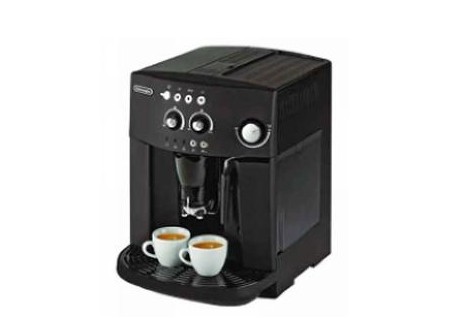
Decoding Common Coffee Machine Error Messages in English
If your coffee machine suddenly flashes an unfamiliar English warning — say, 'BREWUNIT MISSING' or 'DREGDRAWER FULL' — it’s easy to panic. But these alerts aren’t random; they’re your machine’s way of telling you exactly what’s wrong. Whether you’re using a home espresso machine or a semi-automatic setup, understanding these messages can save you time, coffee, and costly repairs.
Here’s the quick guide: 'SELECT PRODUCT READY FOR USE' means your machine is good to go — just pick your brew and press start. Most other alerts (like 'BREWUNIT BLOCKED' or 'DREGDRAWER FULL') signal specific issues that need fixing before you can brew again.
What ‘SELECT PRODUCT READY FOR USE’ Really Means
When your machine displays 'SELECT PRODUCT READY FOR USE', it’s in its ideal state: the boiler is heated, the brew group is seated correctly, and everything is primed for brewing. This is your cue to choose your preferred coffee type (espresso, lungo, etc.) and press the corresponding button. No further action is needed — you’re ready to pull a shot.
Common Error Messages and What They Mean
Coffee machines use specific English alerts to indicate problems. Here’s a breakdown of the most frequent ones, exactly as they appear on your display:
- BREWUNIT BLOCKED: The brew group (where the coffee puck forms) is either jammed, obstructed, or malfunctioning. The manual advises cleaning and reseating it, but if the issue persists, contact a technician.
- BREWUNIT MISSING: The brew group isn’t properly installed — it might be misaligned or the service door isn’t fully closed. Fix this by repositioning the brew group or ensuring the door is shut tightly.
- DESCALING: Your machine’s internal boiler has built up mineral deposits (scale) and requires descaling to maintain performance and prevent damage.
- DREGDRAWER MISSING: The coffee grounds drawer (dreg drawer) isn’t seated correctly. Reinsert it properly to resolve the alert.
- DREGDRAWER FULL: The dreg drawer is full of used coffee grounds. Empty it immediately to avoid overflow or brewing issues.
- ENERGY SAVING: The machine has entered power-saving mode. Press the 'ENTER' button to wake it up and resume normal operation.
- COFFEE BEANS EMPTY: There are no coffee beans in the hopper. Refill the bean container and restart the machine.
- FILL WATERTANK: The water tank is empty. Add fresh water before attempting to brew.
- GRINDER BLOCKED: The grinder is jammed, likely due to beans stuck in the burrs or a foreign object. Clean the grinder or seek professional help if needed.
- OVER TEMPERATURE: The machine has overheated. Allow it to cool, then run a water drainage cycle to reset.
- VENTILATE: The water tank or internal water pathways are empty, but the boiler is trying to heat. Drain any remaining air or refill the tank before heating.
- WARMING UP: The boiler is heating up. Wait 3–5 minutes until the display shows 'SELECT PRODUCT' or 'READY FOR USE' before brewing.
Why These Alerts Matter
These messages aren’t just annoyances — they’re safeguards. For example, 'BREWUNIT BLOCKED' prevents you from forcing a shot through a jammed group head, which could damage the machine. 'DESCALING' alerts you to mineral buildup that, if ignored, can clog valves and ruin your espresso’s flavor. Understanding them helps you maintain your machine’s performance and extend its lifespan.
Frequently Asked Questions
What does 'SELECT PRODUCT READY FOR USE' mean on my coffee machine?
This message means your coffee machine is fully heated, the brew group is correctly installed, and it’s ready for you to select your desired coffee type (like espresso or lungo) and start brewing. No troubleshooting is needed — just press the button for your preferred brew.
Why does my machine show 'BREWUNIT BLOCKED' and how do I fix it?
'BREWUNIT BLOCKED' means the brew group (where espresso is extracted) is jammed or obstructed. Check for blockages, clean the brew group thoroughly, and ensure it’s properly seated. If the problem continues, consult your manual and contact a professional technician.
What should I do if I see 'DREGDRAWER FULL' on the display?
This alert means the coffee grounds drawer (dreg drawer) is full of used espresso pucks. Empty the drawer completely, clean it if necessary, and reinsert it properly to clear the alert and continue brewing.
How do I handle a 'DESCALING' warning on my espresso machine?
'DESCALING' means mineral deposits have built up in your machine’s boiler. Run a descaling cycle using a manufacturer-approved descaling solution to remove the buildup. This prevents long-term damage and maintains brewing performance.
Why is my machine in 'ENERGY SAVING' mode and how do I turn it off?
'ENERGY SAVING' activates when the machine hasn’t been used for a while. To wake it up, simply press the 'ENTER' button. The machine will return to normal operation and display 'SELECT PRODUCT' or 'READY FOR USE' when ready.
What causes 'OVER TEMPERATURE' and what should I do?
'OVER TEMPERATURE' occurs when the machine’s boiler gets too hot. Turn off the machine and let it cool down. Once cooled, you may need to run a water drainage cycle to reset the system and clear the alert.
Recommended FrontStreet Coffee Beans for Home Espresso
For home espresso machines, try FrontStreet Coffee’s Classic Blend (notes of butter, nuts, and dark chocolate), Specialty Blend (brighter with citrus and floral hints), or Black Cocoa Blend (rich cocoa and spice tones). These beans are freshly roasted and optimized for consistent extractions, whether you’re dialing in a double shot or steaming milk for a latte. Freshly roasted within 5 days · Orders placed before 17:00 ship the same day · Next-day delivery across most of Guangdong Province.
FrontStreet Coffee is a long-established specialty coffee roaster in Guangzhou China, selling freshly roasted beans from its own farm in Yunnan as well as dozens of carefully selected single-origin beans from around the world for both pour-over and espresso. The products deliver consistently excellent quality and great value, with shipping within 24 hours. Guangzhou's FrontStreet Coffee shop is recommended by many coffee lovers, and the beans are now available online at the Tmall 。
Important Notice :
前街咖啡 FrontStreet Coffee has moved to new addredd:
FrontStreet Coffee Address: 315,Donghua East Road,GuangZhou
Tel:020 38364473