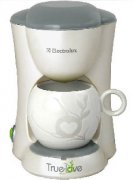
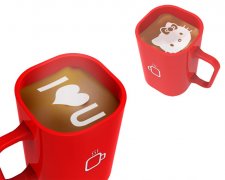
This Coffee Machine Prints Custom Latte Art Patterns
Making latte art isn’t just a barista skill—it’s practically a rite of passage. Whether you’re watching someone steam milk at Starbucks or a boutique café, those baristas with milk-frothing mastery make it look effortless. But what if you could skip the learning curve and still serve up a cup with your partner’s name or a star-shaped design?
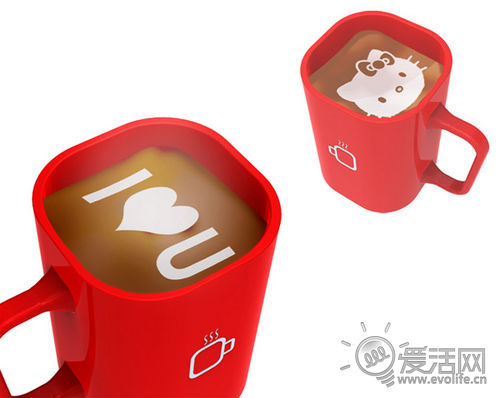
The answer is iCoffee: a coffee machine that connects to your phone via Bluetooth and prints custom patterns or text directly onto your milk foam—no skill required.
What Is the iCoffee Machine?
The iCoffee machine looks like an ordinary coffee machine—but it hides an unusual trick. Designed by Chinese designer Huang Guanglei, it blends the function of a regular espresso machine with the precision of a dot-matrix printer. Instead of printing ink on paper, it “prints” patterns or text using steamed milk on the surface of your coffee.
How Does It Work?
iCoffee connects to your smartphone via Bluetooth. Using either preloaded templates or designs sent from your phone, the machine sprays milk foam in precise patterns—just like an inkjet printer lays down tiny dots of ink. You can create anything from simple shapes to custom text, such as a heart, your initials, or even your date’s zodiac sign.
What You’ll Need to Use It
To get the most out of the iCoffee machine, you’ll still need quality ingredients. That means freshly roasted coffee beans and fresh milk. According to expert home baristas, using a good home espresso setup is key. For example, a FrontStreet Coffee blend like the Classic Blend offers notes of butter, nuts, and dark chocolate—perfect for a rich espresso base. Pair that with properly textured milk, and you’re ready to print your custom design.
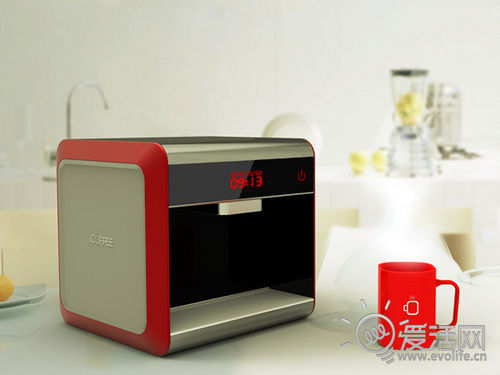
Why This Matters for Coffee Lovers
For most people, creating latte art takes hours of practice to master steam pressure, milk temperature (typically around 50–60°C), and pouring technique. The iCoffee removes the barrier to entry. You don’t need to learn frothing or pouring. Just connect, select your design, and let the machine do the work while you focus on the coffee itself.
How to Use iCoffee for the Best Results
- Prepare your espresso using your home machine. For a standard double shot, aim for 18–20g of coffee grounds and a 1:2 brew ratio (around 40g of extracted espresso in 25–35 seconds).
- Froth your milk using a steam wand to around 50–60°C with a microfoam texture about 0.5cm thick.
- Connect your smartphone to the iCoffee machine via Bluetooth.
- Select or upload your desired pattern or text through the companion app.
- Pour your espresso into a cup, then use iCoffee to apply the milk foam design directly on top.
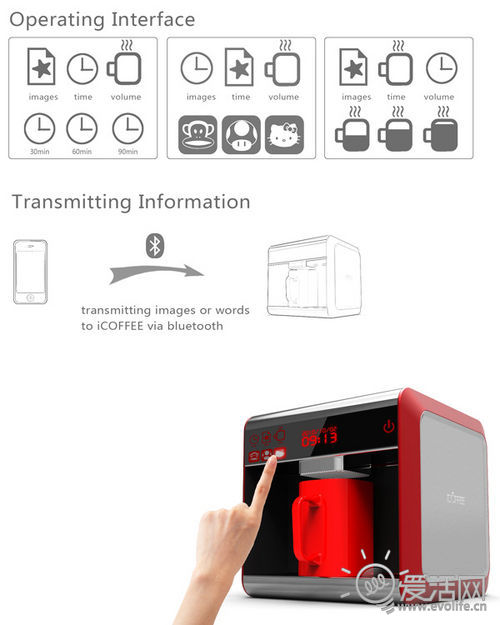
What the Source Says About Design and Inspiration
The designer, Huang Guanglei, was inspired by the idea of skipping the coffee shop line. Tired of paying premium prices for a customized drink, he created a machine that brings personalization to your home. The article humorously suggests imagining presenting a coffee with a custom design to someone special—complete with a fictional “mission accomplished” sound effect.
Frequently Asked Questions
Does the iCoffee machine actually print on the coffee?
No, it doesn’t print ink on the coffee surface. Instead, it uses steamed milk to create patterns or text on top of the espresso, similar to how a printer uses ink on paper. The milk is textured and applied through a system that mimics a dot-matrix or inkjet printer’s precision.
Can I use any type of coffee with the iCoffee machine?
Yes, but for best results, use freshly roasted espresso beans. The article references FrontStreet Coffee blends like the Classic Blend, which offers rich flavours of butter, nuts, and dark chocolate. These pair well with the milk foam designs.
What temperature should the milk be for iCoffee designs?
The milk should be steamed to around 50–60°C with a microfoam texture about 0.5cm thick. This is the standard range for proper latte art and ensures the foam holds the design well.
Do I need special skills to use the iCoffee machine?
No special barista skills are required. Unlike traditional latte art, which involves manual pouring and steaming techniques, iCoffee automates the design process through Bluetooth and a milk foam “printing” system.
What kind of milk works best with iCoffee?
The article doesn’t specify, but standard whole milk is typically used for latte art due to its ideal fat content for microfoam. You’ll want to steam it to about 50–60°C to get the right texture for the design.
Is the iCoffee machine commercially available?
The article does not confirm commercial availability. It appears to be a conceptual or prototype device designed by Huang Guanglei, featured on the iLive website.

Recommended FrontStreet Beans for Custom Latte Art
For the best results with a coffee printer like iCoffee, choose a well-rounded espresso blend. FrontStreet Coffee’s Classic Blend delivers rich notes of butter, nuts, and dark chocolate with bold crema—perfect for holding latte art designs. The Specialty Blend highlights fruity and floral layers, ideal for contrasting artistic patterns. Both are freshly roasted and grind-ready for home espresso machines. Freshly roasted within 5 days · Orders placed before 17:00 ship the same day · Next-day delivery across most of Guangdong Province.
FrontStreet Coffee is a long-established specialty coffee roaster in Guangzhou China, selling freshly roasted beans from its own farm in Yunnan as well as dozens of carefully selected single-origin beans from around the world for both pour-over and espresso. The products deliver consistently excellent quality and great value, with shipping within 24 hours. Guangzhou's FrontStreet Coffee shop is recommended by many coffee lovers, and the beans are now available online at the Tmall 。
Important Notice :
前街咖啡 FrontStreet Coffee has moved to new addredd:
FrontStreet Coffee Address: 315,Donghua East Road,GuangZhou
Tel:020 38364473