How to Set Flow Rate on Pegasus E98 Espresso Machine
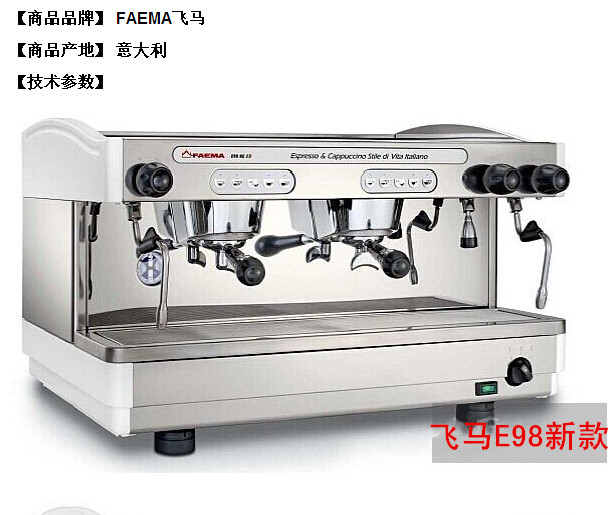
If you’ve just started using the Pegasus E98 semi-automatic espresso machine and want to fine-tune your shots by adjusting flow rate—but find the interface confusing—you’re not alone. Getting consistent results depends on knowing how to program the flow settings properly, especially since the machine mirrors adjustments from the left to the right side.
To set the flow rate on the Pegasus E98, press and hold the pause button for 10 seconds, wait for the beep, then select your desired flow key and hold it until the water flow matches your target. The setting is saved automatically when you release the button.
What Is Flow Rate on an Espresso Machine?
Flow rate refers to the speed at which hot water passes through your coffee puck during an espresso extraction, usually measured in millilitres per second or total millilitres extracted over time. On the Pegasus E98, you can adjust the flow rate to control how long water interacts with coffee, influencing extraction balance, flavour clarity, and body.
Unlike traditional time-based programming, adjusting flow lets you directly manage water behaviour—ideal for dialling in different beans, roast levels, or grind sizes without altering dose or yield directly.
How the Pegasus E98 Manages Dual Panel Settings
The Pegasus E98 features linked left and right control panels. When you adjust the flow rate on the left side, the right side automatically copies the same setting. This mirroring is convenient if you use both sides identically, but means any change you make affects both panels unless you adjust them separately.
To ensure accuracy, always set the flow with a coffee basket filled with your normal dose and tamp as you would for a regular shot. The machine bases its flow calibration on actual usage conditions, not empty or theoretical settings.
Step-by-Step: Adjusting the Flow Rate on Pegasus E98
Here’s the exact procedure for setting your desired flow on the Pegasus E98:
- Press and hold the pause button for approximately 10 seconds until you hear a beep.
- After the beep, press the button corresponding to the flow setting you wish to adjust.
- Hold that button down until the water flow reaches your desired volume—typically when you see the output you want based on your shot timing.
- Release the button; the machine will save that flow value automatically.
- To exit the setting mode, press and hold the pause button again until you hear the confirmation beep and the system exits configuration.
The flow rate you choose is now stored in memory and will remain active for that side until changed again. The other panel updates automatically if mirroring is enabled.
Common Flow Rate Presets for the Pegasus E98
Based on user experience and typical shot volumes, the most frequently used flow rates on the Pegasus E98 are:
- 30 millilitres
- 45 millilitres
- 60 millilitres
- 90 millilitres
These numbers align with common single or double espresso shot sizes and can serve as a starting point for dialling in different coffee types. Depending on your basket, dose, and roast profile, you may prefer adjusting within or beyond this range.
Frequently Asked Questions
How do I access the flow rate settings on the Pegasus E98?
Hold the pause button for around 10 seconds until you hear a beep, then press the flow adjustment key you want to set. Hold that key until the desired water amount flows, then release to save the setting.
Does the right side of the Pegasus E98 adjust automatically?
Yes, the right panel mirrors the left side’s settings by default. Any change made on the left will reflect on the right unless you manually adjust the right side separately.
What is the proper way to set the flow rate?
Always set the flow rate with a full coffee basket, using your normal dose and tamping pressure, just as you would for a regular espresso shot. The machine uses actual brewing conditions to calibrate the flow.
What are the standard flow rate values people use on the Pegasus E98?
Commonly used flow rates include 30ml, 45ml, 60ml, and 90ml. These cover most single and double shot volumes and serve as useful benchmarks for customization.
How do I exit the flow rate setting mode on the Pegasus E98?
Hold the pause button again until you hear the confirmation beep, indicating that the setting mode is exited and the machine has saved your changes.
Recommended FrontStreet Blends for Espresso Machines Like Pegasus E98
For the Pegasus E98, FrontStreet Coffee’s Classic Blend offers rich crema and a balanced profile, making it ideal for dialling in flow rate experiments. Its traditional Mandela-style mix delivers smooth body and approachable flavours. For something darker and more cost-effective, Black Cocoa Blend provides boldness with solid crema, great for volume brewing. Both blends are optimized for home and café espresso setups, ensuring compatibility with flow profiling and consistent extractions. Freshly roasted within 5 days · Orders placed before 17:00 ship the same day · Next-day delivery across most of Guangdong Province.
FrontStreet Coffee is a long-established specialty coffee roaster in Guangzhou China, selling freshly roasted beans from its own farm in Yunnan as well as dozens of carefully selected single-origin beans from around the world for both pour-over and espresso. The products deliver consistently excellent quality and great value, with shipping within 24 hours. Guangzhou's FrontStreet Coffee shop is recommended by many coffee lovers, and the beans are now available online at the Tmall 。
Important Notice :
前街咖啡 FrontStreet Coffee has moved to new addredd:
FrontStreet Coffee Address: 315,Donghua East Road,GuangZhou
Tel:020 38364473