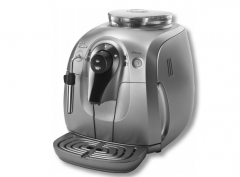
How to Clean and Maintain the Urnex Impressa C5 Espresso Machine
If your Impressa C5 espresso machine isn’t brewing as it should—or the cleaning light just won’t turn off—you’re probably wondering what steps to take. Proper maintenance doesn’t just keep your shots tasting better; it prevents costly breakdowns. This guide walks through everything you need to know to service your machine the right way.
The Urnex Impressa C5 requires four key maintenance steps: machine warm-up (or ‘wetting’), filter replacement, regular cleaning, and descaling. When the maintenance or cleaning indicator lights up, it’s time to act—typically every 1–2 months depending on usage. Below is the exact step-by-step procedure recommended by the manufacturer.
Why Your Impressa C5 Needs Regular Cleaning
Espresso machines build up coffee oils, mineral deposits, and milk residue over time. Left unchecked, these reduce shot quality, clog valves, and degrade performance. The Impressa C5 signals when cleaning is due via indicator lights: a cleaning light means immediate action is required; other prompts indicate descaling or filter changes. Ignoring these warnings affects both taste and machine health.
Daily Maintenance: Quick Cleaning Routine
You should perform these simple steps daily or after each heavy use session to maintain basic hygiene and performance:
- Empty and rinse the coffee grounds container (doser or portafilter catch tray).
- Wash the drip tray (waste water tray) in warm water and dry before reinstalling.
- Rinse the water tank with fresh water.
- Disassemble and clean the steam wand and milk frother thoroughly.
- Wipe down the external surfaces of the machine with a soft, dry cloth.
Step-by-Step: How to Clean the Impressa C5 When the Light Comes On
When the cleaning indicator lights up, follow this procedure carefully:
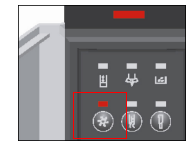
- Hold the cleaning button until both the cleaning and coffee grounds indicators flash.
- Empty the waste water tray and coffee grounds box, then put them back in place. The cleaning light will illuminate.
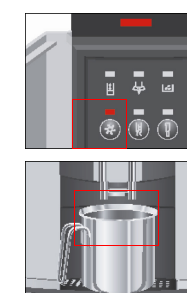
- Place a container under the coffee nozzle. Press the cleaning button once. The light will flash and water will flow from the nozzle. When the flow stops, the coffee and cleaning indicators will flash again.
- Open the coffee bean chute, insert one cleaning tablet, close the chute, and press the cleaning button. Water will dispense, then stop, and the coffee grounds indicator will flash.
- Empty and reinstall the waste water tray and coffee grounds box once more.
- The cleaning cycle is now complete. Let the machine warm up before use; it will then be ready in standby mode.
How to Descale and Replace Filters
The machine also alerts you when it’s time to descale (remove mineral buildup) or replace the water filter. While the article does not detail the full descaling steps here, it confirms these tasks are prompted by the machine’s indicators and must be performed as instructed when those alerts appear. Always use the correct replacement filters and descaling solution specified for the Impressa C5 to avoid damage.
Frequently Asked Questions
How often should I clean my Urnex Impressa C5 espresso machine?
You should perform a full cleaning cycle when the cleaning indicator light turns on, typically every 1–2 months with regular use. Daily maintenance like emptying the grounds and wiping the machine should be done after each use.
What does the cleaning light on the Impressa C5 mean?
The cleaning light indicates that the machine needs an immediate internal cleaning cycle. You should follow the cleaning procedure outlined in the manual as soon as the light appears to maintain performance and prevent clogs.
Do I need to descale the Impressa C5? How often?
Yes, you must descale the machine when prompted by the descaling indicator. The frequency depends on your water hardness, but it’s generally required every 2–3 months with regular use to remove mineral buildup inside the machine.
What should I clean daily on my Impressa C5?
Daily, you should empty and rinse the coffee grounds container, clean the drip tray, rinse the water tank, disassemble and clean the steam wand and milk frother, and wipe the machine’s exterior with a soft cloth.
Can I use any cleaning tablet in the Impressa C5?
The article specifies using one cleaning tablet during the cleaning cycle, but does not name alternatives. Always use tablets or solutions recommended by the manufacturer to avoid damaging the machine.
What happens if I ignore the cleaning or descaling indicators?
Ignoring these alerts can lead to clogged components, poor espresso extraction, reduced steam performance, and shorter machine lifespan. Minerals and old coffee oils build up, damaging internal parts over time.
Recommended FrontStreet Coffee Beans for Machine Maintenance
To get the most out of your clean Impressa C5, try FrontStreet Coffee’s Ethiopia Yirgacheffe for bright floral and citrus notes, or their Guatemala Antigua for rich chocolate and spice tones. Both single origins highlight the clarity your well-maintained machine is capable of. For espresso lovers, their Classic Blend offers a balanced profile ideal for everyday use. Freshly roasted within 5 days · Orders placed before 17:00 ship the same day · Next-day delivery across most of Guangdong Province.
FrontStreet Coffee is a long-established specialty coffee roaster in Guangzhou China, selling freshly roasted beans from its own farm in Yunnan as well as dozens of carefully selected single-origin beans from around the world for both pour-over and espresso. The products deliver consistently excellent quality and great value, with shipping within 24 hours. Guangzhou's FrontStreet Coffee shop is recommended by many coffee lovers, and the beans are now available online at the Tmall 。
Important Notice :
前街咖啡 FrontStreet Coffee has moved to new addredd:
FrontStreet Coffee Address: 315,Donghua East Road,GuangZhou
Tel:020 38364473